Skip to content

For home care agencies

Work in the same record as the families you care for.

Kinlovi gives your agency a workspace on the web for visits, doses, handovers and notes, inside each family’s own care circle. Families approve your people, and see your team’s work as it happens.

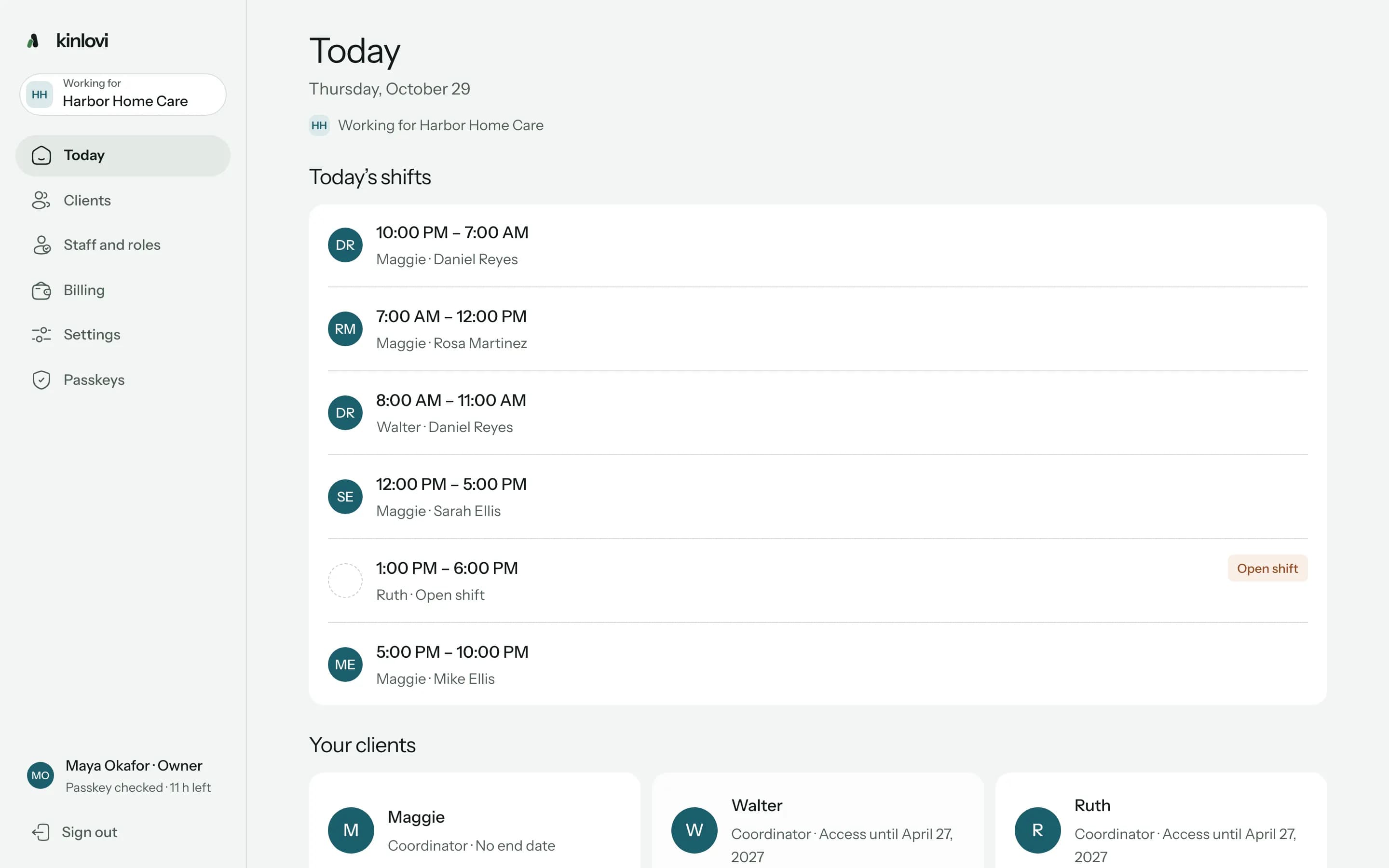
A day at the agency, on one screen.

Coordinators see every visit across their clients. Caregivers and nurses see the shift they’re on and what it needs.

Plan the week around the family

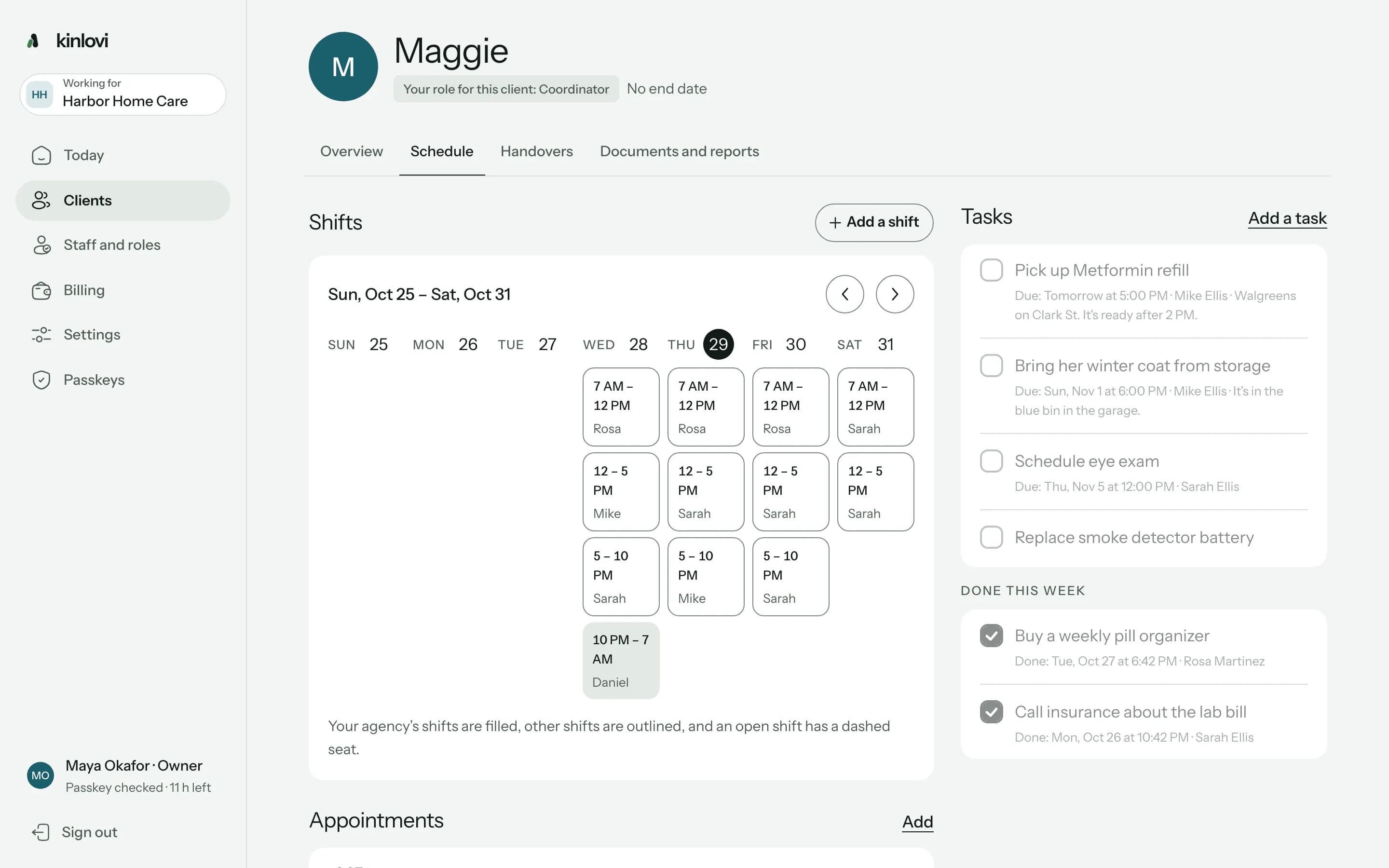
Each client’s schedule shows your agency’s shifts filled in and the family’s own outlined, with the circle’s tasks beside them. Give someone a shift and they accept it or say they can’t make it.
A client’s week: the agency’s shifts beside the family’s, and the circle’s tasks

Everything for the shift they’re on

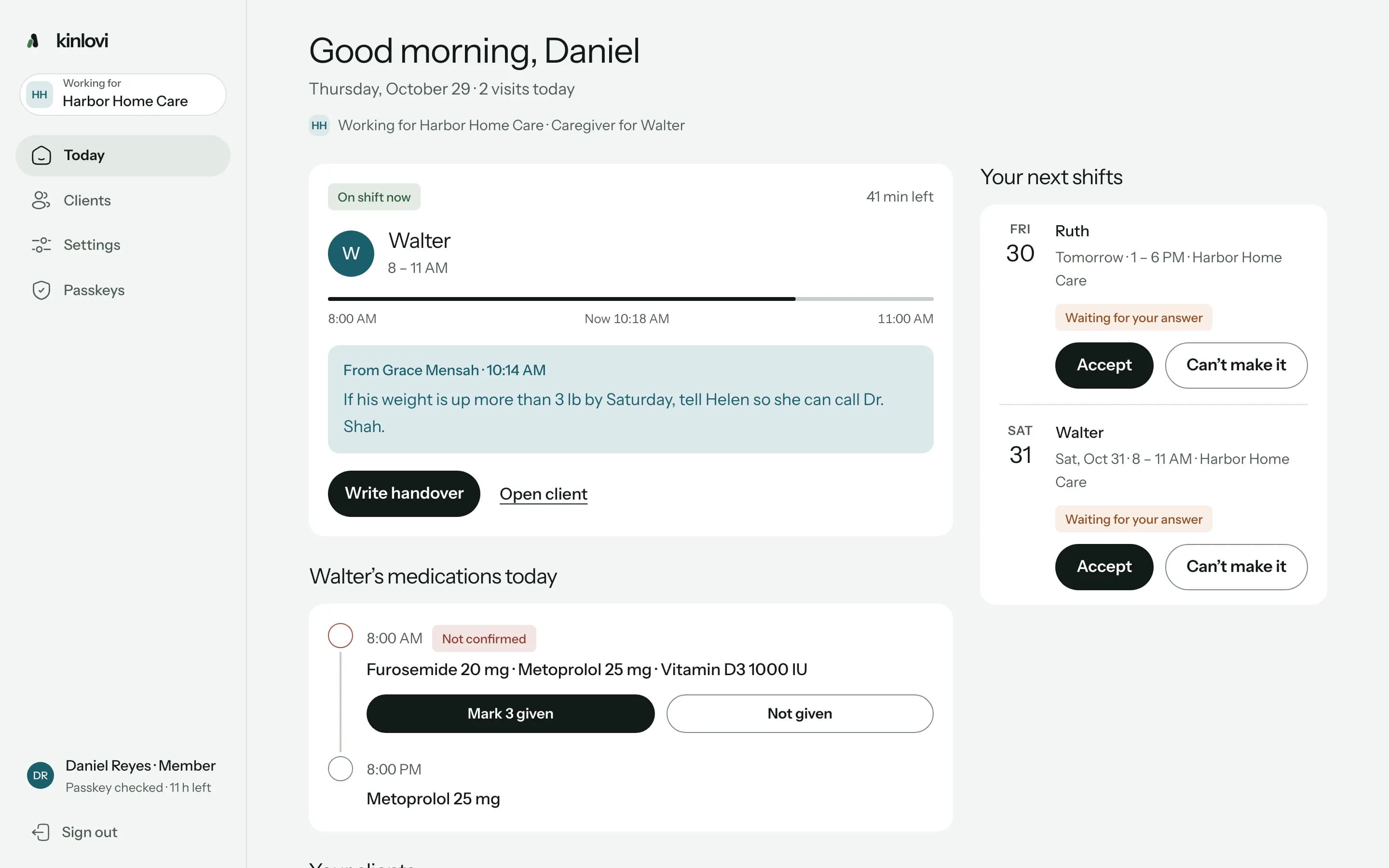
Daniel sees his visit with Walter, the time left, the note Grace left for him, Walter’s doses for the day and the shifts waiting for his answer.
Daniel’s Today: on shift with Walter, Grace’s note, Walter’s doses and the next shifts

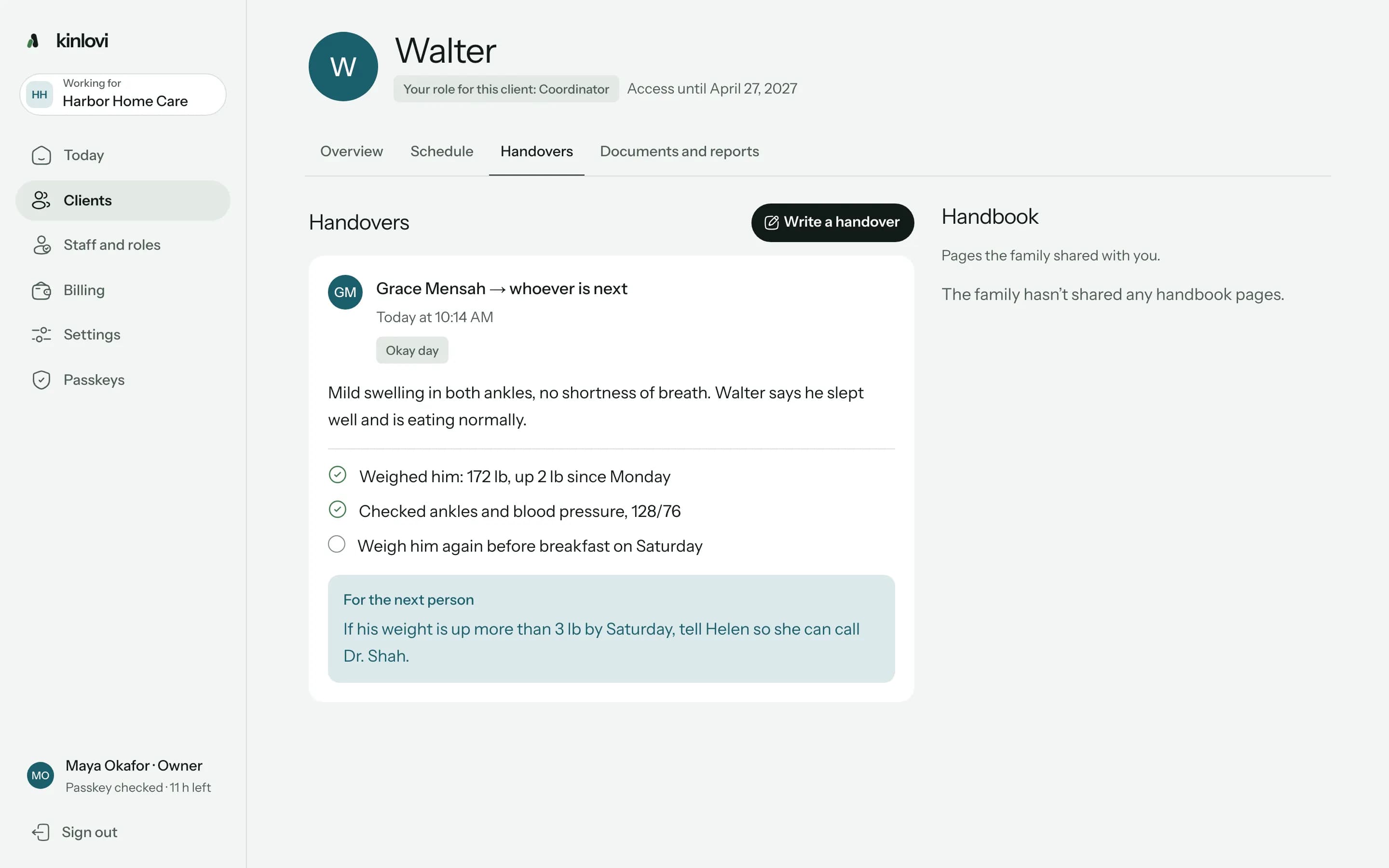
Handovers the next person reads

What was done, what’s left and a note for whoever is next. Your nurses and caregivers hand over to each other, and the family reads it too.
Grace’s handover after her nurse visit to Walter

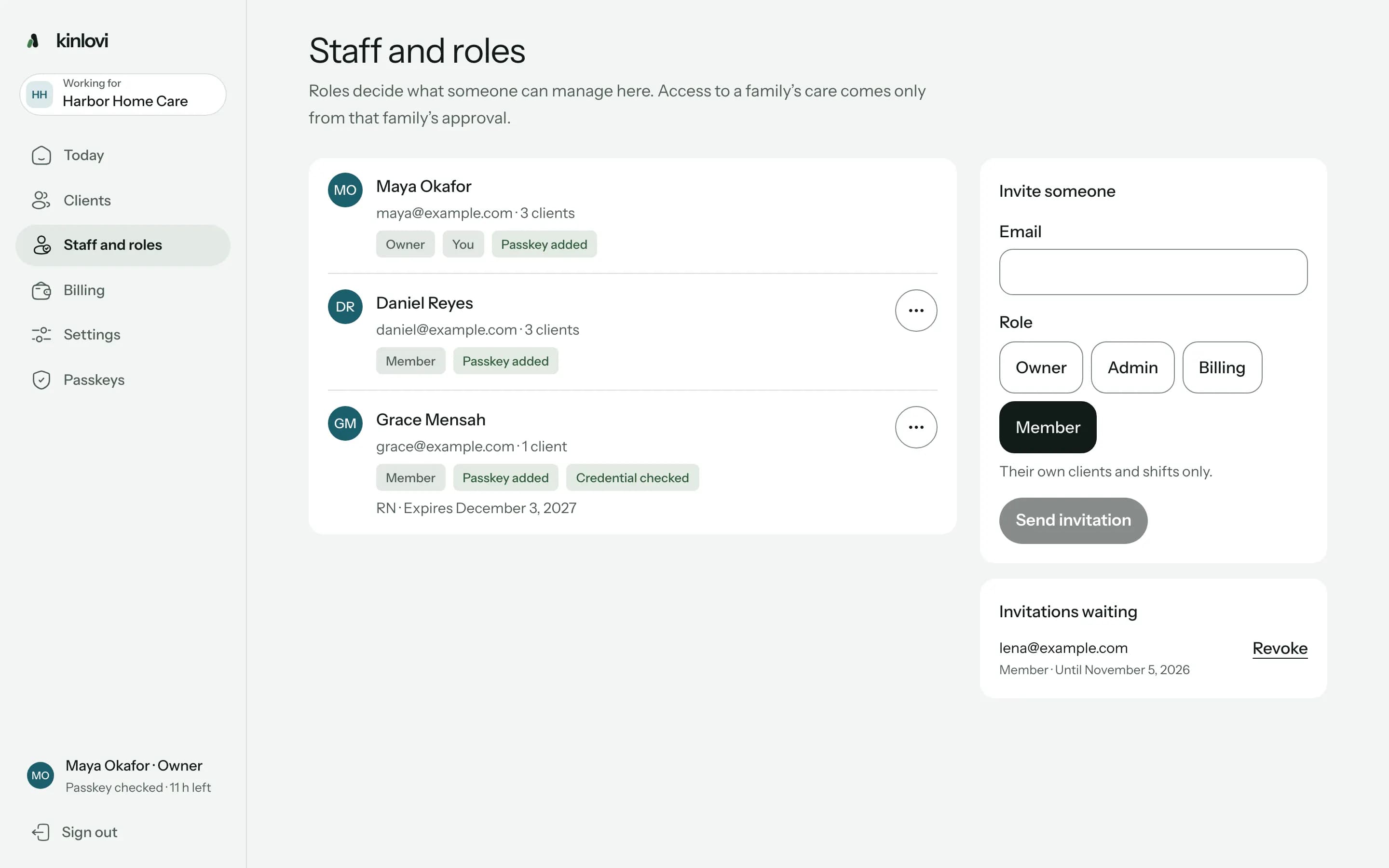
Your team, roles and credentials

Invite staff by email and give each a role: owner, admin, billing or member. Record a nurse’s credential and when it expires, and families see it was checked.
Staff and roles: owner, members, passkeys and a nurse’s checked credential

Families let you in, person by person.

Send a family an invitation code. Once they connect, you ask for the people you’ll send and what each one needs, and they approve it.

CL-DXG3GZ2D

Ask the family for access

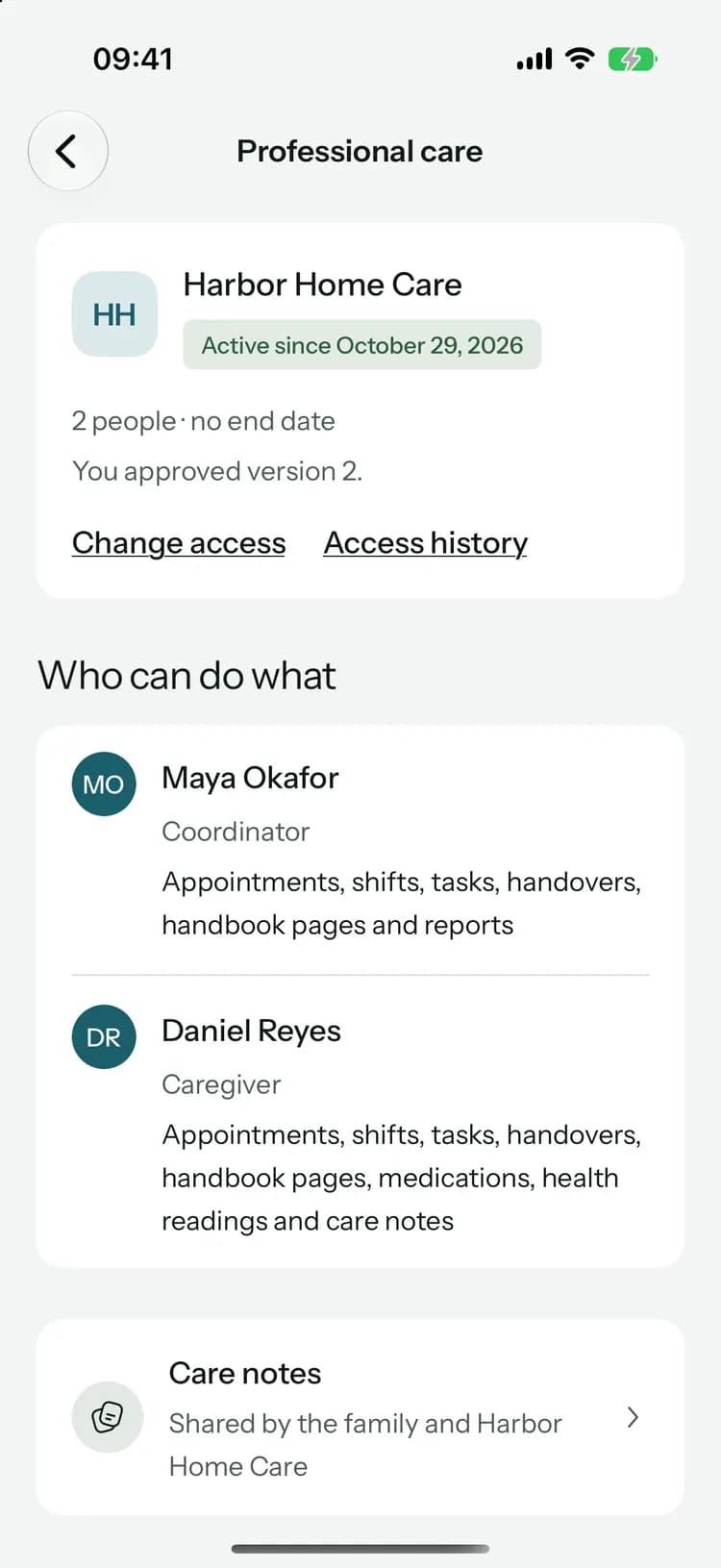
The family approves each person and what they can do. Start with what each duty needs and take away the rest.

  • Grace MensahClinician

    • Allergies, conditions and doctors
    • Medications and doses
    • Reads and writes care notes
    • Reads the documents you choose and adds their own
  • Daniel ReyesCaregiver

    • Works and plans shifts
    • Medications and doses
    • Reads and writes handovers
Access endsApril 27, 2027

You ask for what each duty needs

Assign a coordinator, a caregiver or a clinician, start from what their duty needs and take away the rest. Set an end date, and ask for AI only if you use it.

Harbor Home Care

Waiting for your answer

Harbor Home Care would like to help with Mom’s care

Nothing is shared until you approve. You can change or end it later.

  • Maya Okafor

    Coordinator

    • Plans appointments and drives, not visit notes
    • Works and plans shifts
    • Reads and writes handovers
    • Reads the handbook pages you choose
  • Daniel Reyes

    Caregiver

    • Medications and doses
    • Records health readings
    • Reads and writes care notes
    • Reads the handbook pages you choose
Care handbookWhat she eats · 1 of 6 chosen

The family approves it

They see each person by name and what they’d do, pick the handbook pages and documents to share, and can end it sooner. Kinlovi checks first that they can approve.

Want to see the family’s side? Professional care for families

Clinical work that keeps its history.

Nurses update medications, record doses and readings, and write care notes signed with their duty. Nothing your team records is deleted: it’s changed, stopped or corrected with a reason, and every earlier version stays.
  • A dose is recorded once. If the family or another nurse already gave it, your caregiver is told instead of logging it twice.
  • Changes to a medication say who made them, when and why: an entry error, a clinical review or a prescriber’s change.
  • Handbook edits go back to the family for approval.

Metoprolol 25 mgTwice a day · Walter

Earlier versions

  1. Grace Mensah changed itClinician at Harbor Home Care · Today at 10:02 AMWhy: Prescriber’s change: new dose from Dr. Shah’s letterBefore: 12.5 mg, twice a day
  2. Helen Brooks added itFamily · Sep 14

On the phone they already carry.

The workspace runs in the browser, so caregivers work from their own phone with nothing to install. They mark doses given, accept shifts and write the handover before they leave.

Working forHarbor Home Care

On shift now · 2 hrs 40 min left

Maggie7:00 AM – 12:00 PM

Morning · 8:00 AM

Due
  • Lisinopril 10 mg1 tablet
  • Metformin 500 mg1 tablet · Take with food

Access you can explain to every family.

Families trust you with their records. Kinlovi makes sure your team only sees what the family approved, and shows them who opened what.

  • Passkeys for everyone

    No passwords. Everyone confirms it’s them again every 12 hours, and changing roles, credentials or billing asks for the passkey again.
  • Roles never open care

    Admins see clients by reference. Care opens only for the people assigned to a client and approved by its family.
  • Every access recorded

    Each time someone opens or changes a record, it’s recorded, and the family sees who and when. Never what they saw.
  • Notifications that say nothing

    Reminders and alerts never name the client, and access is checked again before each one is sent.
  • What stays with the family

    Family updates, chat, expenses, visit notes and documents they didn’t pick never reach your team.
  • AI only with permission

    Agency AI drafts handovers and summaries for families who allow it. A professional reviews every draft, and you pay for it.

Security for agencies

Pay for the clients you serve.

Your plan counts client places, one for each family you serve at a time: €5 a month each for your first 25 places, €3 for places 26 to 100 and €2 for every place after that. Staff seats are included, with no setup fee or minimum, and families never pay for your workspace.
  • Start with a free 30-day pilot from Kinlovi, then add places as families join. Prices exclude tax, and the workspace shows yours before you pay.
  • Offer to cover a family’s Family plan if you like. Funding shares nothing about their care, and ending your access doesn’t end it.
  • Agency AI, if you turn it on, comes from a monthly budget and never uses a family’s own allowance.
Ask about a pilot
Active

3 of 5 client places

Pilot until November 28, 2026

Funded families

CL-DSQV5MFWFundedFamily plan until May 4, 2027

Apply in a few minutes.

Sign in with your work email, with no password to make up, and fill in one short form. Have your registration or licence number to hand.

  1. 1

    Apply

    Your agency’s legal name, its registration or licence number, the kinds of care you offer and who we should contact.
  2. 2

    Kinlovi reviews it

    We check every agency before it can work with families. If something’s missing we tell you, and you update the same application.
  3. 3

    Invite your team

    Each person joins from an email invitation and adds a passkey on their phone or computer.
  4. 4

    Invite your families

    Give each family an invitation code. They connect, and approve the people you ask for.

Common questions

Something else? Talk to us

Bring your agency to Kinlovi.

Kinlovi reviews every agency before it can work with families. Applying takes a few minutes, and we’ll email you when it’s done.

Already working in Kinlovi? Agency sign in

We’d like to use PostHog analytics cookies to learn which pages help people. They stay off unless you accept. Storage that keeps the site working is always on. Read more in our Privacy Policy.